 2 photos
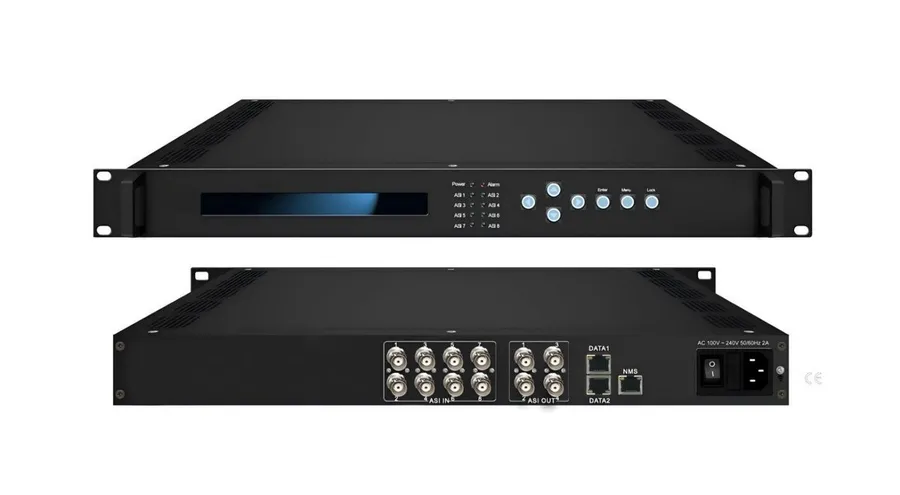
FUQ-10 IP Gateway 8 ASI Inputs 512 IP Inputs UDP ISO13818 EN300 468
The Hanxing FUQ-10 is an IP gateway in the FUQ1 line, built in our Guangzhou headend factory. Published specifications: Output range 0x0000—0x1FFF; ASI 2 groups separate outputs; Amount of output PID 180. 9 parameters are published on this page from the model's own datasheet; quotations are factory-direct.
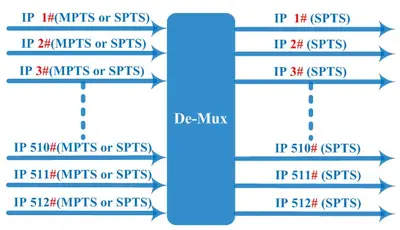
Our FUQ-10 IP gateway takes 8 ASI inputs and 512 IP inputs through DATA ports for digital TV head-end systems in CATV broadcasting. TS re-multiplexing, PID re-mapping and EPG insertion keep UDP streams in order, and web-based NMS allows remote control over Ethernet. The processing path follows ISO13818 and EN300 468.
- Output range
- 0x0000—0x1FFF
Send the channel count, input format and output standard — we reply with a model confirmation and factory-direct pricing.
Technical specifications
Taken from the datasheet we publish for the FUQ-10. Every value below comes from our own specification document — ask us if you need a parameter that is not listed.
| ASI | 2 groups separate outputs (each group has 2 channels) |
|---|---|
| Output range | 0x0000—0x1FFF |
| PID transparent | Any PID transparent and mapping achievable |
| Amount of output PID | 180 |
| Ethernet port | 10/100M/1000M self adaption |
| General: Dimensions | 482mm×300mm×44mm (WxLxH) |
| General: Weight | 3.5kg |
| General: Temperature | 0~45℃ (operation), -20~80℃ (storage) |
| General: Power supply | AC 110V±10%, 50/60Hz Or AC 220V±10%, 50/60Hz |
FUQ-10 datasheet
Our full FUQ-10 datasheet (Word .docx, editable) — interfaces, formats, dimensions and power.
FUQ-10 — quick answers
Direct answers about the Hanxing FUQ-10: what it is, what it is typically used for, and the parameters we publish for it. Nothing here is estimated — where a value is not published, the answer says so rather than guessing.
What is the Hanxing FUQ-10?
Our FUQ-10 IP gateway takes 8 ASI inputs and 512 IP inputs through DATA ports for digital TV head-end systems in CATV broadcasting.
What is the FUQ-10 used for between an IP backbone and an ASI or RF leg?
Interfacing between IP and ASI/RF legs of a headend — multicast to ASI conversion, IP backbones, and satellite or terrestrial feeds.
What is the price of the FUQ-10, and how do I get a quote?
Hanxing builds this headend equipment in our own factory in Guangzhou, and it is offered for sale factory-direct. Send the channel count, the input format and the output standard you need, and we reply with the price, lead time and shipping options.
What are the outputs of the FUQ-10?
Output range: 0x0000—0x1FFF
What are the physical dimensions of the FUQ-10?
General: Dimensions: 482mm×300mm×44mm (WxLxH)
Is the FUQ-10 datasheet available?
Yes — the datasheet we publish for the FUQ-10 is on this page and can be opened or downloaded directly.
Typical use
Interfacing between IP and ASI/RF legs of a headend — multicast to ASI conversion, IP backbones, and satellite or terrestrial feeds.
- Cable TV
- OTT & streaming
- Broadcast headends
- EPG systems
More from this range
All IP Gateway models
Next stage in the chain
A gateway moves programs between the IP backbone and the ASI or RF legs of a headend. What happens next depends on the destination: streams that continue as IP go to a multiplexer for re-mapping and scrambling before they are distributed to the network.
Get a quote for the FUQ-10
Tell us the quantity, the input sources and the output standard you distribute. We confirm the configuration against the unit we build and come back with pricing, lead time and shipping options.